Once Price Lock is on in Settings, every seasonal quote gets a Contract pricing switch in the pricing panel: Standard (one discount every year) or Price Lock (price drops each year, with loyalty savings). One quote uses one style. Your customer never sees both.
Set up the quote
- Build the quote as usual (measurements, items, fees).
- Under Contract Options, click 3 Years (or 2 Years for a 2-year Price Lock).
- Under Contract pricing, click Price Lock.
The two standard discount rows are replaced by a Price Lock table.
Read the table
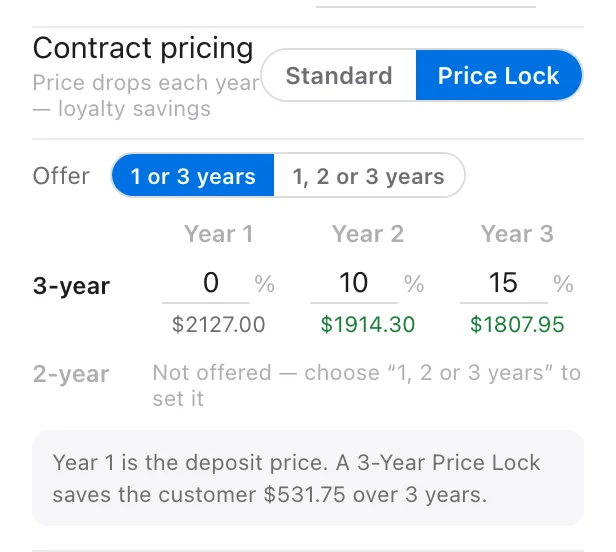
Each row is a term the customer can sign. Each column is a year of that contract.
- The box is the % off for that year.
- The amount under it is what the customer pays that year, worked out live from this quote’s total.
On a $2,127 quote with 0% / 10% / 15%:
| 3-year | Year 1 | Year 2 | Year 3 |
|---|---|---|---|
| % | 0% | 10% | 15% |
| Price | $2,127.00 | $1,914.30 | $1,807.95 |
Under the table, a summary line reads: “Year 1 is the deposit price. A 3-Year Price Lock saves the customer $531.75 over 3 years.”
Prices are exact to the cent, so 10% off $2,127 shows as $1,914.30, not $1,914.
If you type a later year with a smaller discount than an earlier one, you’ll see a warning. That would make the price go up that year.
Choose 1 or 3 years
With 3 Years selected, an Offer switch sits above the table:
- 1 or 3 years: the customer sees a 1-year price and a 3-Year Price Lock. The 2-year row is greyed out with “Not offered — choose “1, 2 or 3 years” to set it”.
- 1, 2 or 3 years: the 2-year row opens up so you can set it too.
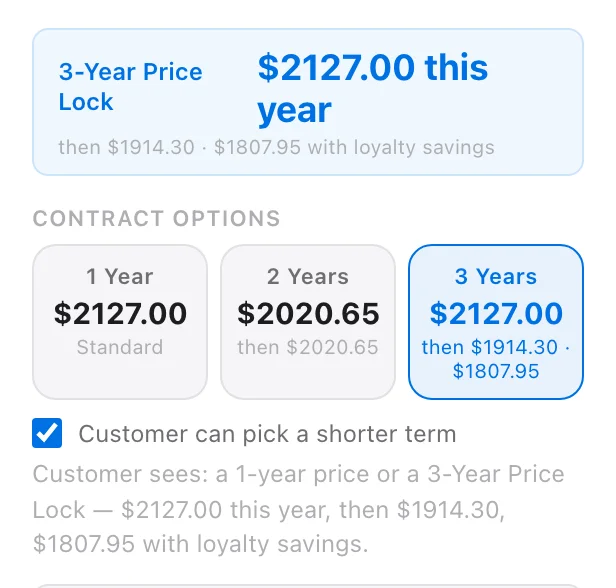
To offer only the 3-Year Price Lock, untick Customer can pick a shorter term under the contract cards.
Check what the customer will see
Below the contract cards, LightQuoter spells it out, for example:
Customer sees: a 1-year price or a 3-Year Price Lock — $2127.00 this year, then $1914.30, $1807.95 with loyalty savings.
The price strip under your total also changes to 3-Year Price Lock · $2127.00 this year · then $1914.30 · $1807.95 with loyalty savings.
Year 1 and the deposit
The year-1 price is what the deposit is charged on. Leave year 1 at 0% and the deposit is the same whether the customer picks 1 year or 3 years. Put a discount on year 1 and a 3-year customer’s deposit gets a little smaller.
Good to know
- Picking a contract card saves a sent quote right away, so your customer’s link always matches. Settle your numbers before you send.
- Switching between Standard and Price Lock keeps each style’s numbers while the quote is open, so flipping back and forth loses nothing. The style showing when you save is the one the customer gets.
- Not available on: permanent installs, locations in a property bundle (bundles use standard contracts for now), and renewals in the middle of a contract (that price is already locked).