A Price Lock is a multi-year contract where the price goes down each year the customer stays with you. Year 1 is your normal price. Years 2 and 3 get loyalty savings. Your customer sees a 3-Year Price Lock on their quote and picks it or a 1-year price.
It sits alongside your standard contracts (one discount every year). It doesn’t replace them, and you choose the style on each quote.
Turn it on
Price Lock is rolling out to accounts gradually. If you don’t see it under Contract Pricing yet, it isn’t available on your account yet.
- Go to Settings and find the Item Library & Default Pricing card.
- Scroll to Contract Pricing.
- Switch on Price Lock with loyalty savings.
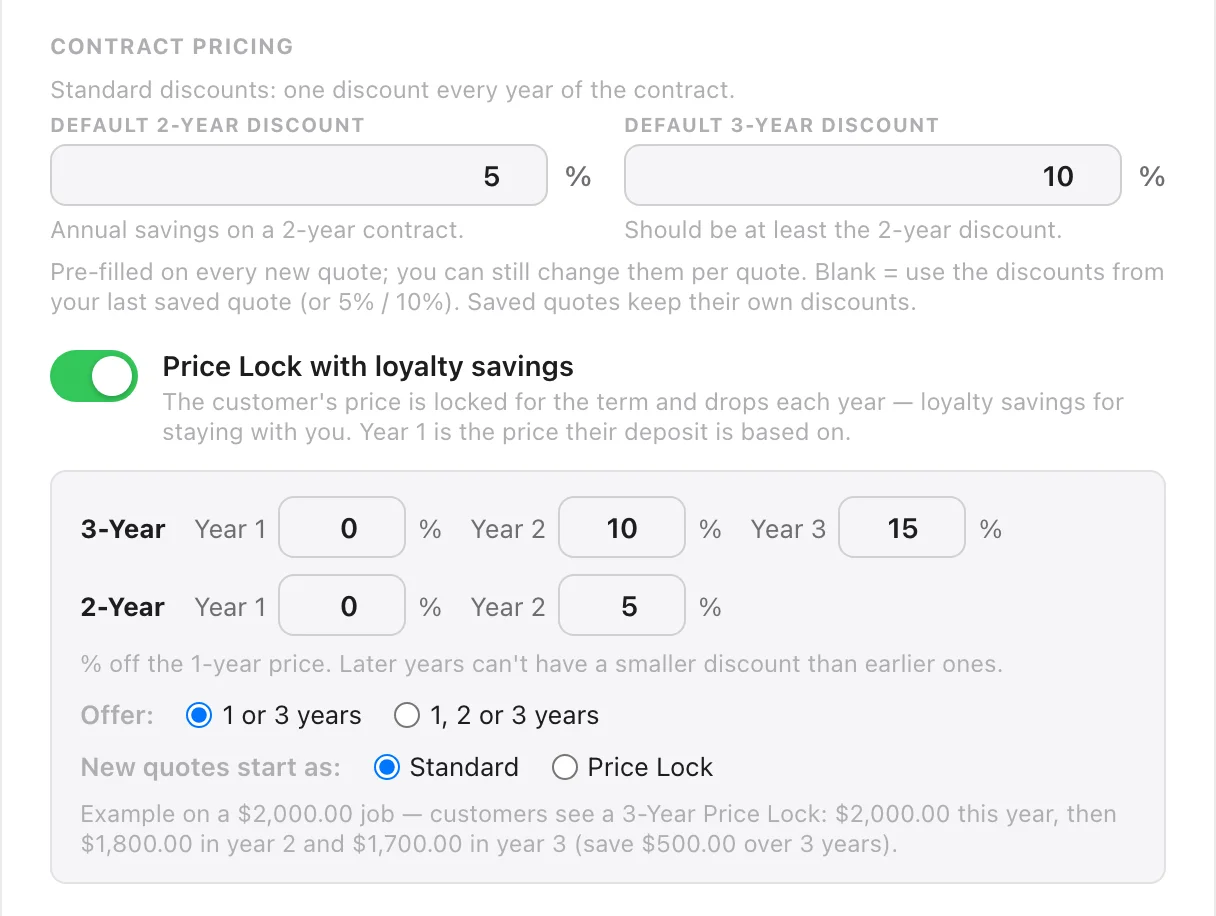
Set your year-by-year savings
Each box is the % off the 1-year price for that year of the contract.
| Term | Year 1 | Year 2 | Year 3 |
|---|---|---|---|
| 3-Year | 0% | 10% | 15% |
| 2-Year | 0% | 5% | — |
Those are the starter numbers. Change them to whatever you like, with two rules:
- Fill in every box. 0% is fine, and it’s the usual choice for year 1.
- A later year can’t have a smaller discount than an earlier one, so the price never goes up from one year to the next.
Tip: leave year 1 at 0%. Year 1 is the price the deposit is based on, so with year 1 at full price, a customer who picks 3 years pays the same deposit as one who picks 1 year.
Choose what you offer
- Offer: 1 or 3 years: the customer sees a 1-year price and a 3-Year Price Lock. This is the default.
- Offer: 1, 2 or 3 years: they also get a 2-year option.
You can change this on any quote later.
Choose how new quotes start
New quotes start as: Standard or Price Lock. This is only the starting point. You can switch any quote in the quoter.
Check the example and save
Under the boxes, LightQuoter shows what a customer would see on a $2,000 job. With the starter numbers:
Example on a $2,000.00 job — customers see a 3-Year Price Lock: $2,000.00 this year, then $1,800.00 in year 2 and $1,700.00 in year 3 (save $500.00 over 3 years).
Click Save Item Library when it looks right.
Why your standard discounts got filled in
When you switch Price Lock on, your Default 2-Year Discount and Default 3-Year Discount must be filled in. If they were blank, LightQuoter fills them with what your quotes use today (from your most recent quote, or 5% and 10%) and says so. That keeps your standard quotes defaulting to the numbers you already use. Change them if you want, then save.